
Bulk Patient Create
curl --request POST \
--url https://api.sandbox.metriport.com/medical/v1/patient/bulk \
--header 'x-api-key: <api-key>'import requests
url = "https://api.sandbox.metriport.com/medical/v1/patient/bulk"
headers = {"x-api-key": "<api-key>"}
response = requests.post(url, headers=headers)
print(response.text)const options = {method: 'POST', headers: {'x-api-key': '<api-key>'}};
fetch('https://api.sandbox.metriport.com/medical/v1/patient/bulk', options)
.then(res => res.json())
.then(res => console.log(res))
.catch(err => console.error(err));<?php
$curl = curl_init();
curl_setopt_array($curl, [
CURLOPT_URL => "https://api.sandbox.metriport.com/medical/v1/patient/bulk",
CURLOPT_RETURNTRANSFER => true,
CURLOPT_ENCODING => "",
CURLOPT_MAXREDIRS => 10,
CURLOPT_TIMEOUT => 30,
CURLOPT_HTTP_VERSION => CURL_HTTP_VERSION_1_1,
CURLOPT_CUSTOMREQUEST => "POST",
CURLOPT_HTTPHEADER => [
"x-api-key: <api-key>"
],
]);
$response = curl_exec($curl);
$err = curl_error($curl);
curl_close($curl);
if ($err) {
echo "cURL Error #:" . $err;
} else {
echo $response;
}package main
import (
"fmt"
"net/http"
"io"
)
func main() {
url := "https://api.sandbox.metriport.com/medical/v1/patient/bulk"
req, _ := http.NewRequest("POST", url, nil)
req.Header.Add("x-api-key", "<api-key>")
res, _ := http.DefaultClient.Do(req)
defer res.Body.Close()
body, _ := io.ReadAll(res.Body)
fmt.Println(string(body))
}HttpResponse<String> response = Unirest.post("https://api.sandbox.metriport.com/medical/v1/patient/bulk")
.header("x-api-key", "<api-key>")
.asString();require 'uri'
require 'net/http'
url = URI("https://api.sandbox.metriport.com/medical/v1/patient/bulk")
http = Net::HTTP.new(url.host, url.port)
http.use_ssl = true
request = Net::HTTP::Post.new(url)
request["x-api-key"] = '<api-key>'
response = http.request(request)
puts response.read_bodyPatient
Bulk Patient Create
Creates a batch of patients in Metriport and initiates Document Queries for all of them.
POST
/
medical
/
v1
/
patient
/
bulk
Bulk Patient Create
curl --request POST \
--url https://api.sandbox.metriport.com/medical/v1/patient/bulk \
--header 'x-api-key: <api-key>'import requests
url = "https://api.sandbox.metriport.com/medical/v1/patient/bulk"
headers = {"x-api-key": "<api-key>"}
response = requests.post(url, headers=headers)
print(response.text)const options = {method: 'POST', headers: {'x-api-key': '<api-key>'}};
fetch('https://api.sandbox.metriport.com/medical/v1/patient/bulk', options)
.then(res => res.json())
.then(res => console.log(res))
.catch(err => console.error(err));<?php
$curl = curl_init();
curl_setopt_array($curl, [
CURLOPT_URL => "https://api.sandbox.metriport.com/medical/v1/patient/bulk",
CURLOPT_RETURNTRANSFER => true,
CURLOPT_ENCODING => "",
CURLOPT_MAXREDIRS => 10,
CURLOPT_TIMEOUT => 30,
CURLOPT_HTTP_VERSION => CURL_HTTP_VERSION_1_1,
CURLOPT_CUSTOMREQUEST => "POST",
CURLOPT_HTTPHEADER => [
"x-api-key: <api-key>"
],
]);
$response = curl_exec($curl);
$err = curl_error($curl);
curl_close($curl);
if ($err) {
echo "cURL Error #:" . $err;
} else {
echo $response;
}package main
import (
"fmt"
"net/http"
"io"
)
func main() {
url := "https://api.sandbox.metriport.com/medical/v1/patient/bulk"
req, _ := http.NewRequest("POST", url, nil)
req.Header.Add("x-api-key", "<api-key>")
res, _ := http.DefaultClient.Do(req)
defer res.Body.Close()
body, _ := io.ReadAll(res.Body)
fmt.Println(string(body))
}HttpResponse<String> response = Unirest.post("https://api.sandbox.metriport.com/medical/v1/patient/bulk")
.header("x-api-key", "<api-key>")
.asString();require 'uri'
require 'net/http'
url = URI("https://api.sandbox.metriport.com/medical/v1/patient/bulk")
http = Net::HTTP.new(url.host, url.port)
http.use_ssl = true
request = Net::HTTP::Post.new(url)
request["x-api-key"] = '<api-key>'
response = http.request(request)
puts response.read_bodyThe Bulk Patient Create endpoint allows you to create and kick off Document Queries for a batch of
Patients in a single request.
It performs a create or update based on each patient’s demographics. If the demographics match an
existing patient (same first/last name, date of birth, gender at birth, and at least one zip code),
it will update the existing patient. Otherwise, a new patient will be created.
If a CSV row includes
Example
The first Patient below has two email addresses, the second Patient only has one email, and the
third Patient has three email addresses:
For address fields, they work as a group: if you provide
Currently, a max of 100,000 patients in a batch is
supported.
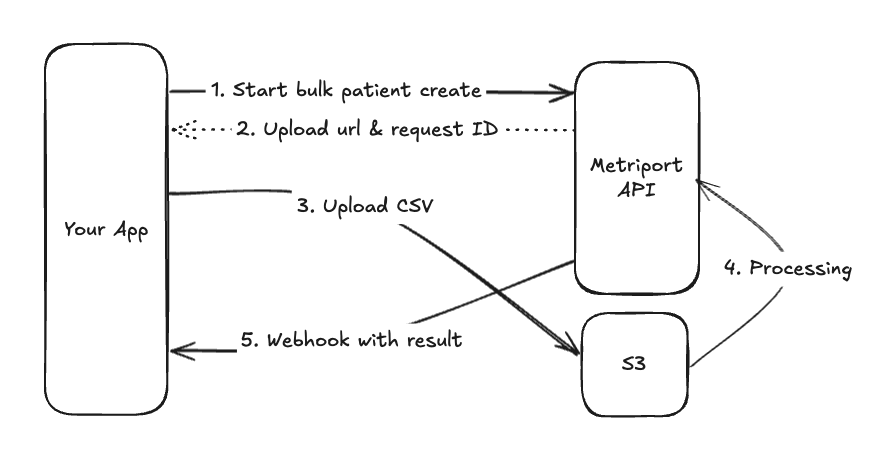
This is an asynchronous endpoint: you upload a file with
patient demographics, and we notify you when the process
is completed through a webhook
message.
hieOptOut=true, the corresponding patient is opted out of network
discovery and document queries.
The response to this endpoint contains a URL that you should use to upload a file containing the
Patient demographics that will be used to create individual Patients. More on this
below.
Input CSV File Format
The file with the patient demographics should be created as comma-separated values, CSV. You can access an example of the file here. We support up to 10 addresses, 10 email addresses, 10 phone numbers, and 10 cohorts. In order to provide those, just index each column with-N at the end of the column name, where N is the index (1-10).
Show CSV columns
Show CSV columns
You may provide a comma/space delimited string to
specify multiple first and last names. For example, the
following inputs would be equivalent:
"John,Jonathan"
& "John Jonathan" - these would translate to ["John", "Jonathan"].string
The ID of the Patient in your system - it’s available
throughout the Metriport API.
string
required
The Patient’s first name(s).
string
required
The Patient’s last name(s).
string
required
The Patient’s gender at birth, can be one of
M or F
or O or U. Use O (other) when the patient’s gender
is known but it is not M or F, i.e intersex or
hermaphroditic. Use U (unknown) when the patient’s
gender is not known.string
required
The address.
string
The address details, for example:
#4451.string
required
The city.
string
required
The 2 letter state acronym, for example:
CA.string
required
5 digit zip code.
string
The Patient’s 10 digit phone number, formatted
1234567899.string
The Patient’s email address.
string
The 9 digit SSN number.
string
The driver’s license number.
string
The 2 letter state acronym, for example:
CA.
Required if driversLicenceNo is provided.string
The UUID of a cohort you would like this patient to be added to. See Working With Cohorts for more info.
string
Specifies the facility where the patient receives care. If omitted, the system will use the default facility used to initiate the Bulk Patient Create.
string
Accepted values are
true or false (case-insensitive).
When set to true, the patient is opted out of network discovery and document queries.
Defaults to false.| … | zip* | email-1 | email-2 | email-3 | … |
|---|---|---|---|---|---|
| … | 12345 | some@domain.com | another@domain.com | … | |
| … | 12312 | avocado@food.com | … | ||
| … | 99887 | lawyer@job.com | personal@domain.com | family@domain.com | … |
addressLine1-2, then all address fields
with index 2 are required (otherwise, the respective row/Patient will be marked as invalid).
Following this logic, if you don’t provide any address field for index 3 through 10, all the
address fields for those indexes are disconsidered, and the Patient is considered valid (assuming
other non-address fields are valid too).
At least one complete address must be provided:
- addressLine1-1
- addressLine2-1
- city-1
- state-1
- zip-1
Validation
This endpoint validates access to the provided Facility ID (or that there’s only one if omitted). It will return a404 if the facility can’t be found or 400 if there’s more than one Facility
and the ID was not provided.
Once the CSV is uploaded, the Metriport API will also validate the file is in the expected format
(CSV). It might set the status of the request to failed and send a corresponding webhook message.
If those previous validations are successful, each row will be validated individually and it’s
respective status will be stored so it can be reviewed in the
result CSV file (it won’t fail the whole
request at this point).
Uploading the CSV
The URL is pre-signed to your account and has a duration of 10 minutes. It should only be used once. Use it to send aPUT request like so:
curl --location --request PUT '<UPLOAD-URL>' \
--header 'Content-Type: text/csv' \
--header 'x-api-key: <YOUR-API-KEY>' \
--data-binary '@/local-to-your/file.csv'
Webhook with the result
Once the CSV file is uploaded, the Metriport API starts processing it and sends a webhook message to your App indicating the status isprocessing. Once the patients are created and their medical
data is available, we send a new webhook message indicating the request is done, including
a link to the resulting CSV file that contains the newly created Metriport IDs for the
successfully created Patients.
Bulk Patient Create Status
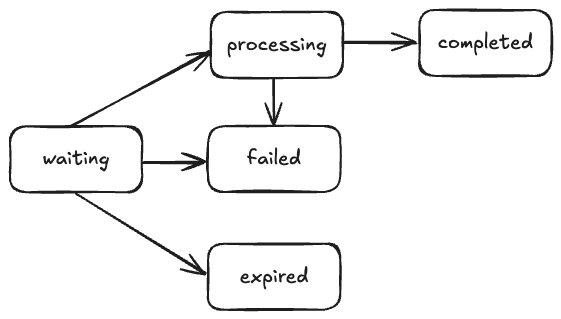
During the processing of a bulk patient create, the request can change status following the logic below:waiting: initial state, waiting for the CSV file;processing: the CSV file has been uploaded and is being processed;completed: the bulk create is completed;failed: the bulk create failed (likely due to an uploaded file with invalid format);expired: no file has been uploaded and the upload URL expired.
Query Params
string
The ID of the default Facility where the Patients receive care.
All patients that don’t have a dedicated facility in the request/CSV will be associated with this default Facility
(see the facilityId column for more details).
It can be omitted if there’s only one Facility in your account.
boolean
When set to
true, no Patients will be created, and this
request is only used to validate the CSV file and provide
feedback about each Patient demographics. Defaults to
false.Body
No body is accepted/processed.Response
string
required
The ID that represents this bulk patient create.
string
required
The status of the bulk bulk patient create. Always
waiting. See all the possible values
here.string
required
The URL to upload the CSV file containing the Patient
demographics to be used to create new Patients. It’s valid
for 10 minutes and should only be used once. See more
details here
Coming soon.
{
"requestId": "00000000-00000000-00000000-00000000",
"status": "waiting",
"uploadUrl": "<presigned-upload-url>"
}